|
STEP 8 - Importing to Quattro
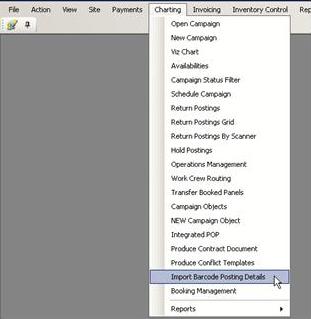
Each Quattro database has been configured to import data from OutdoorAssets.net. In Quattro, go to the Charting menu and choose Import Barcode Posting Details
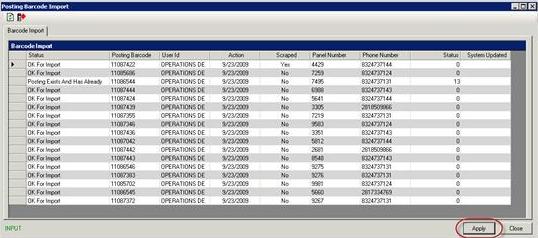
The Posting Barcode Import screen will open displaying all the completed jobs that are ready for import. Click Apply to begin the import process.
So what if I am trying to import, believe there should be records there, and nothing is available for import?
The most common issues reguarding records missing is the activation of our store and forward feature on the handset. If the worker is out of coverage, completes a job and turns his handset offf or turns our software off prior to moving back into cell coverage, the handset has stored the record or records and will not transmit unit that handset I back on. Best first step is to ask the worker to turn their handset back for a few minuts and see if the records show. Quattro is on a 15 minute cycle, so wait 30 minutes and check again using the above import options.
The next step if that is not working is the check here online at OutdoorAssets.net. Did the records get to this sever or not. If they did, chances are there is a malfunction with the Quattro importing process and you should contact Westlake or IT now. If the records are not here online at OutdoorAssets.net as well, follow the step above to make sure the handset is on. If you have already done both the steps above and the records are nowhere to be found, contact us now.
|
